
Download Stock ROM for Oppo A33 CPH2137 (CPH2137)
Below you will find the official & unofficial Stock Firmware for the Oppo A33 CPH2137. You can use this ROM to flash your device using compatible tools.
Stock Firmware for CPH2137
- Firmware Version: CPH2137PU_11_A.10_201209_2a95ecae_unofficialtwrp.com
- ROM Type: Service ROM
Stock Firmware for CPH2137
- Firmware Version: CPH2137PU_11_A.10_201209_2a95ecae_
- ROM Type: Service ROM
How to Install Stock ROM on Your Oppo A33 CPH2137
follow the instructions below to install official stock firmware on your oppo device.- Download latest firmware from above links.
- Charge the device at least 50%.
- Download & Install O + USB Driver on your PC.
- Extract the downloaded ZIP file to a folder.
- Boot your device into Fastboot mode (Power + Volume Down).
- Download & Open O + Service Tool on your PC.
- Login With O+ service ID
- Click Flash Service
- Click Manage Firmware package
- Browse & select extracted ROM folder
- Click \'START\' button
- Connect your device to your PC via USB by holding Volume up + down button at same time.
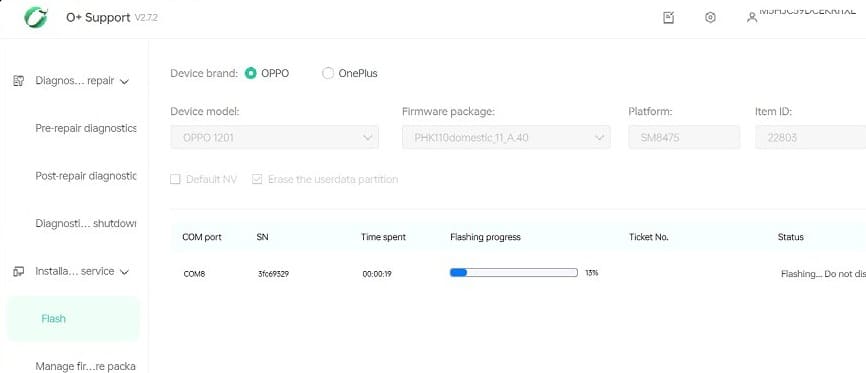
- Wait until the process completes, the device reboot itself.
- have any trouble?, Contact us for Professional help, Tool Login, Auth, Region change.